Optional Challenge : NFT Provenance & On-Chain Data Certification
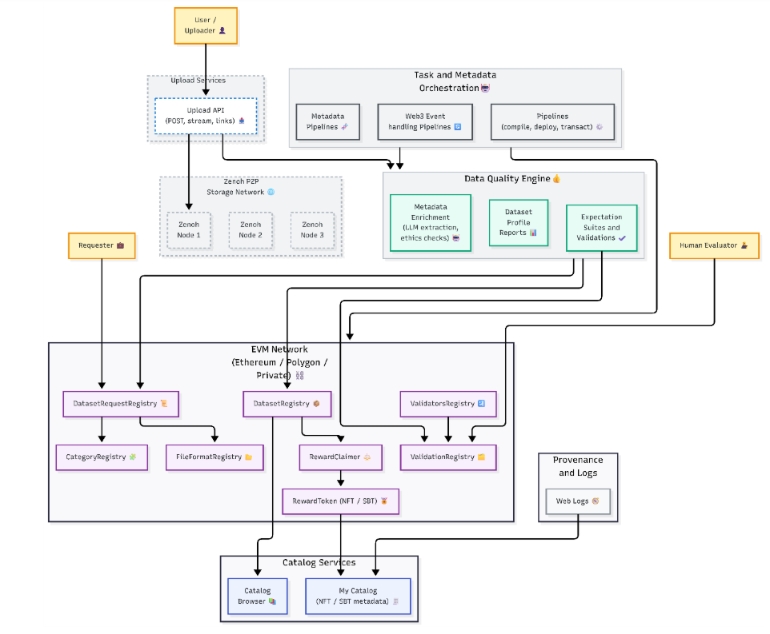
In this challenge, you will connect off-chain DDM artifacts, (used and produced by previous challenge) to on-chain provenance records, and observe how dataset quality becomes a verifiable, immutable commitment under your cryptographic identity (wallet key, ECDSA signatures). You will register dataset requests, datasets, and validations on a real blockchain network, explore on-chain validations by human validators and services and claim certification rewards under web3 governance terms. This is a provenance system not a Web3 demo.
Estimated Time : 20–30 minutes
Difficulty Level : Low/Intermediate (Python understanding needed if challenging with sdk) (web3 concepts basic understanding)
Background
This challenge validates the trust bridge between:
- Off-chain DDM artifacts (datasets, metadata, expectation suites, reports)
- On-chain provenance records (dataset requests, dataset registrations, validation references, rewards)
- Cryptographic identity (wallet keys, signatures, ECDSA)
- Governance & validation (validator permissions, immutable evidence via IPFS)
Key idea: the blockchain stores immutable commitments (references + hashes), not raw datasets.
By completing this challenge, participants must demonstrate that they understand:
- How DDM artifacts become on-chain commitments
- Why dataset fingerprints + signatures matter more than filenames
- How validation is a governance process, not a client-side action
- Why NFTs are certificates, not assets by default
- How incentives (bounties) are unlocked only after multi-party validation
Prerequisites
You can complete this challenge either using the Web3 Provenance Dashboard or using the ddm client SDK. Both paths produce the same artifacts. However, it is recommended that you complete this guide in the UI, as you will need to install only MetaMask browser extension to interact with Sepolia Ethereum Public Network.
After downloading, create an account and connect to Sepolia Network.
To get some funds, follow the instructions in step 3 below.
If you wish to run the challenge through SDK, follow the next steps:
- Follow the README in the ddm_client repository
- Install dependencies and configure .env for blockchain interaction
- Blockchain scripts interact with smart contracts on Sepolia. For that you need:
- An RPC endpoint (recommended: Infura Sepolia)
See here how to create one.
- An account private key (for signing transactions)
For this, the easiest way is to install Metamask wallet.
See here instructions.
- Some Sepolia Eth for gas to run on-chain interactions.
You can use the Chainlink faucet (official):
https://faucet.chainstack.com/sepolia-testnet-faucet
Alternative:
Login to https://ddm.extremexp-icom.intracom-telecom.com
Edit your profile to save your public key by pressing in Sidebar footer.
A tip will be transferred to your wallet.
- Files used in this guide : sample_files/
- prepare_validation.json (if you run challenge using ddm client sdk)
Challenge Steps
You can complete this challenge either using the DDM UI(easiest) or using the Python Client SDK.
DDM UI: Profile Panel
Client SDK: 01_update_profile.py
Bind your DDM username to your Sepolia public key.
Confirm the wallet address matches MetaMask.
Wait some time, and refresh your wallet to see if you received a tip.
DDM UI: Web3 Provenance Dashboard
- Go to Expectations Page and filter expectations to find yours created from challenge 4
- Press
- Fill in required fields
- Deadline
- Category
- Expected number of datasets
- Optional ETH bounty
- Select “Let backend upload to IPFS” option and click Prepare” button,
The DDM returns the ipfs links of the artifacts ready to be anchored to your request.
- Explore them and if you agree, click Create. Sign the transaction and await the receipt. Your dataset Request appears under Dataset Request Registry. Click on the buttons to explore artifacts.
- Check the transaction on Sepolia EtherScan and then check NFTs in your wallet.
Client SDK: 02_register_dataset_request.py
Register a dataset request on Sepolia using suite_id (from the suite created in Challenge 4).
Inputs include:
- Expectation Suite JSON (from Challenge 05)
- Deadline
- Category
- Expected number of datasets
- Optional ETH bounty
- Suite_id
- Requester address
Key artifact produced
An on-chain Dataset Request NFT.. 🎉
What this tests
- Off-chain quality requirements are:
o hashed
o uploaded to IPFS
o anchored on-chain
- The NFT represents intent + constraints, not data
Participants must verify:
- Request appears in the Suite Requests Dashboard
- NFT is visible in MetaMask
- Transaction exists on Sepolia Etherscan
This step:
- Links a DDM catalog/file ID to the dataset request
- Produces a dataset fingerprint
- Registers it on-chain
DDM UI: Web3 Provenance Dashboard
- Click on in the card of the registered dataset request to register a dataset.
- Select titanic_large.csv file from catalog.
- Select “include a data-quality report” for this file and click resgster.
Metamask window will pop up asking you to
- sign the dataset registration details with ECDSA signature (Press Confirm) and
- Pay for the transaction of the registration
- Your dataset Request appears under Dataset Registry and the on-chain validation has begun. Click on the buttons to explore artifacts.
- Check the transaction on Sepolia EtherScan and confirm transactions and events in Contracts Page.
Client SDK: 03_register_dataset
Inputs Include
- suite_id
- catalog_id (DDM catalog/file id)
- dataset-uri (IPFS URI generated by DDM)
- include_report (option to include a dataset report on-chain)
Critical insight
- The fingerprint is the dataset’s identity (a deterministic bytes32 commitment derived from dataset-related content/metadata)
- Filenames, paths, and formats are irrelevant once fingerprinted
Participants must
- Capture the dataset fingerprint
- Verify on-chain registration via dashboard +Sepolia Etherscan
This is where ECDSA signatures matter, it binds the dataset registration to the wallet identity of the uploader by proving that the uploader intentionally signed the dataset fingerprint + URI + suite hash + report URI, preventing spoofing and enabling non-repudiation.
DDM UI: Web3 Provenance Dashboard
- Click on in the card of the registered dataset to register a dataset validation
- Paste validation JSON (backend uploads & returns IPFS URI)
- Submit Validation And Sign the Transaction
- See key question below
Client SDK: 04_register_validation.py
Participants:
- Prepare a validation payload using prepare_validation.json
- Attempt to register a validation result
Key Question:
Did it succeed?
Was this behavior expected?
What this tests
- Governance is enforced on-chain
- Not everyone can validate
- Validation authority is explicit and auditable
If validation fails:
- Participants must wait for registered validators
- This is by design and demonstrates governance.
Requirements:
- Successful dataset registration
- Sufficient successful validations completed (3)
- Matching category and suite
Outcome
- Dataset reward NFT minted
- Bounty (if funded) claimed
What this tests
- Incentives are conditional
- Rewards cannot be front-run
- NFTs represent certified quality, not participation
This is where provenance turns into value.
DDM UI: Web3 Provenance Dashboard
- Click on in the card of the registered dataset to claim rewards
- If you did not try to claim other people’s rewards (which would revert), you can see in your wallets some funds have been trusted and also a Dataset NFT 🏅 (certificate of a high-quality dataset) appears in NFTs section.
- You can confirm transactions and events as in previous steps.
Client SDK: 05_claim_rewards.py
This step claims the bounty/reward for the dataset & validation combination.
You need:
- suite_id from Step 2
- catalog_id from Step 3
- category used in suite registration (e.g. crisis)
After a successful claim:
- Your wallet receives a Dataset NFT 🏅 (certificate of a high-quality dataset)
- The NFT is linked to the validation IPFS results and also proves completion of the tutorial 🎉
DDM UI: Notifications panel (open from Sidebar footer)
Click on in the footer of the sidebar to s3e Notifications.
- Click on last notification to expand and see.
- Mark all notifications as read
Client SDK: 06_get_notifications.py
Participants:
Fetch unread notifications
Track validation progress
Insight
Blockchain is authoritative
Backend notifications are a coordination layer, not truth
Participants must cross-check:
- Notifications
- Dashboard state
- On-chain events
Deliverables
The backend endpoint checks step completion based on stored artifacts and logs, returning per-step status (pending/success/failure). Additionally you will have to provide a file with short answers
- What does the dataset fingerprint represent?
- Why can validation transactions revert?
- What information is stored on-chain vs IPFS vs DDM backend?
- What is the role of the ECDSA signature in dataset registration?
- What is the difference between signing a message and sending a transaction?
- What must be true for reward claim to succeed?