
Challenge 3: Analytics task library
In this challenge, you will learn to include conditional tasks into a workflow. This will allow you to include external tasks provided by the analytics task library and improve a workflow with task generated by the ExtremeXP Community.
Estimated Time : 60–90 minutes
Difficulty Level : Intermediate (intermediate DSL knowledge, some Python understanding)
Background
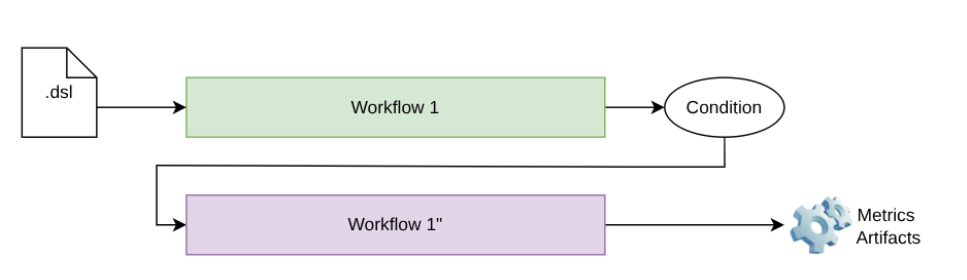
Figure 1 : Conditional workflow
There is not a magic recipe to determine which tasks a practitioner should include in these auxiliary workflows to improve the overall performance of a workflow. Nevertheless, the analytical catalogue provides a set of common tasks identified in the literature that can help improve benchmarking results. In a nutshell, the tasks included in the first release of ExtremeXP are the following :
The process of identifying and retaining the most relevant features while removing redundant or irrelevant ones to improve model performance.
The task of combining data from multiple sources or modalities into a unified representation to improve the model by exploring complementary information.
There is not a magic recipe to determine which tasks a practitioner should include in these auxiliary workflows to improve the overall performance of a workflow. Nevertheless, the analytical catalogue provides a set of common tasks identified in the literature that can help improve benchmarking results. In a nutshell, the tasks included in the first release of ExtremeXP are the following : The generation of additional training samples through transformations to increase data diversity and reduce overfitting.
From a technical perspective, figure 2 illustrates the execution of an experiment that defines a conditional workflow. If the defined condition is not achieved when using the first workflow (for instance, an F-score > 0.65), a second workflow (Workflow 1″) is executed. This second workflow expands the experimentation space by including additional tasks.
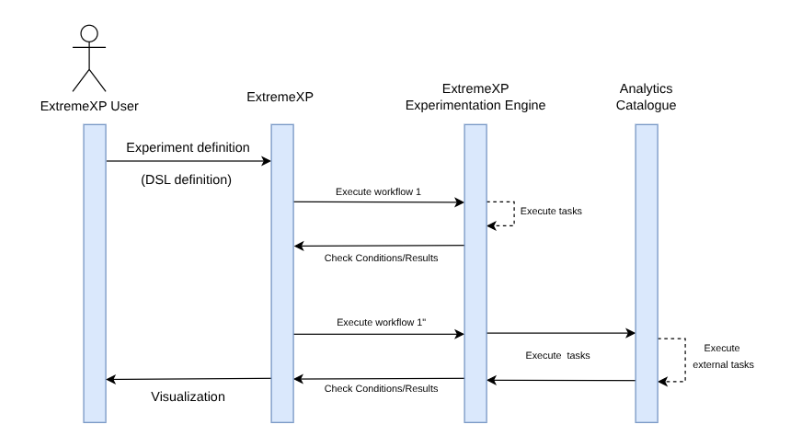
Figure 2 : Conditional workflow execution
Prerequisites
Exercise
-
Format
CSV with numerical features.
-
Size
336 rows, 8 features
-
Target
Binary column churn
-
Features include
mcg, gvh, lip, chg, aac, alm1, alm2
- Download the challenge material provided in the shared folder
- Follow the instructions in the README to generate a uv environment with all the dependencies to run the workflows.
- Once the environment is created, the next step is to generate a first workflow that runs a supervised machine learning model. In this assignment, we already provide the set of tasks; you will find these tasks under the library-tasks directory:
- tasks/load_data.py → Load CSV
- tasks/preprocess_data.py → Split data into test/train
- tasks/train_model.py → Train a Classification model
- tasks/evaluate_model.py → Evaluate the model.
- Complete the workflow_challenge5_baseline.dsl with the expected tasks and variability points. For simplicity, use a max_depth value between 2 and 4
- Run the workflow and analyse the results. Is the workflow obtaining the expected F-score ?
In order to improve the analytical results of the workflow, one option suggested in the literature is the use of data augmentation.
- Check the data augmentation endpoint (http://146.124.106.171:9010).
- Complete the file tasks/analytics_catalogue.py with the correct endpoint information.
- Complete the Challenge5_experiment2.xxp definition, and highlight how the condition is implemented.
- Run the workflow again and evaluate whether the F-score is improved when using data augmentation.
- Create a file named analytics_experiment.xxp that defines the experiment space to explore.
- Declare the experiment parameters and their value ranges
- Define outputs metrics
As you might observe, the potential variability points for Data Augmentation are statically defined. In this step, the workflow is extended to support additional variability points, enabling a more flexible exploration of data augmentation strategies.
- Check the endpoint for valid potential variability points
- Implement the new variability points
- Re-run the workflow